

Help Centre / Workflows and approvals
Can overads post without my approval?
Included in Growth, the one overads plan.
Not unless you allow it. Every overads workflow starts on Ask me first, so each post a workflow writes waits for your approval. A workflow posts on its own only after you switch that workflow to Post without asking and confirm it.
| Where the post came from | Does it wait for approval? |
|---|---|
| A workflow on Ask me first | Yes. Each post waits until you approve it. |
| A workflow on Post without asking | No, up to the daily cap you set for that workflow. Past the cap, posts wait for approval. Anything else the workflow does still asks. |
| A post you schedule yourself in the composer | It goes out at its time, unless Needs approval first is on for that post. |
| A post the assistant drafts in chat | Yes. The assistant shows a card that says what it wants to do, and nothing is scheduled until you say Yes. |
| Any post, with Require approval on in Rules | Yes. Every post waits, whatever made it. |
What Post without asking means
The switch sits in the workflow editor, on any workflow that has a post step. It has two positions: Ask me first and Post without asking. Choosing the second opens a confirmation titled Let this workflow post without asking? It says every post the workflow writes will be published to your connected accounts without you seeing it first, up to the daily cap, and that past the cap posts wait as they do now.
- The daily cap is 1, 2, 3, 5 or 10 posts a day. It starts at 3.
- The setting applies to that one workflow. Every other workflow keeps asking.
- You can switch it back at any time with the same control.
- Only posting changes. Anything else the workflow does always asks.
The ceiling in Rules
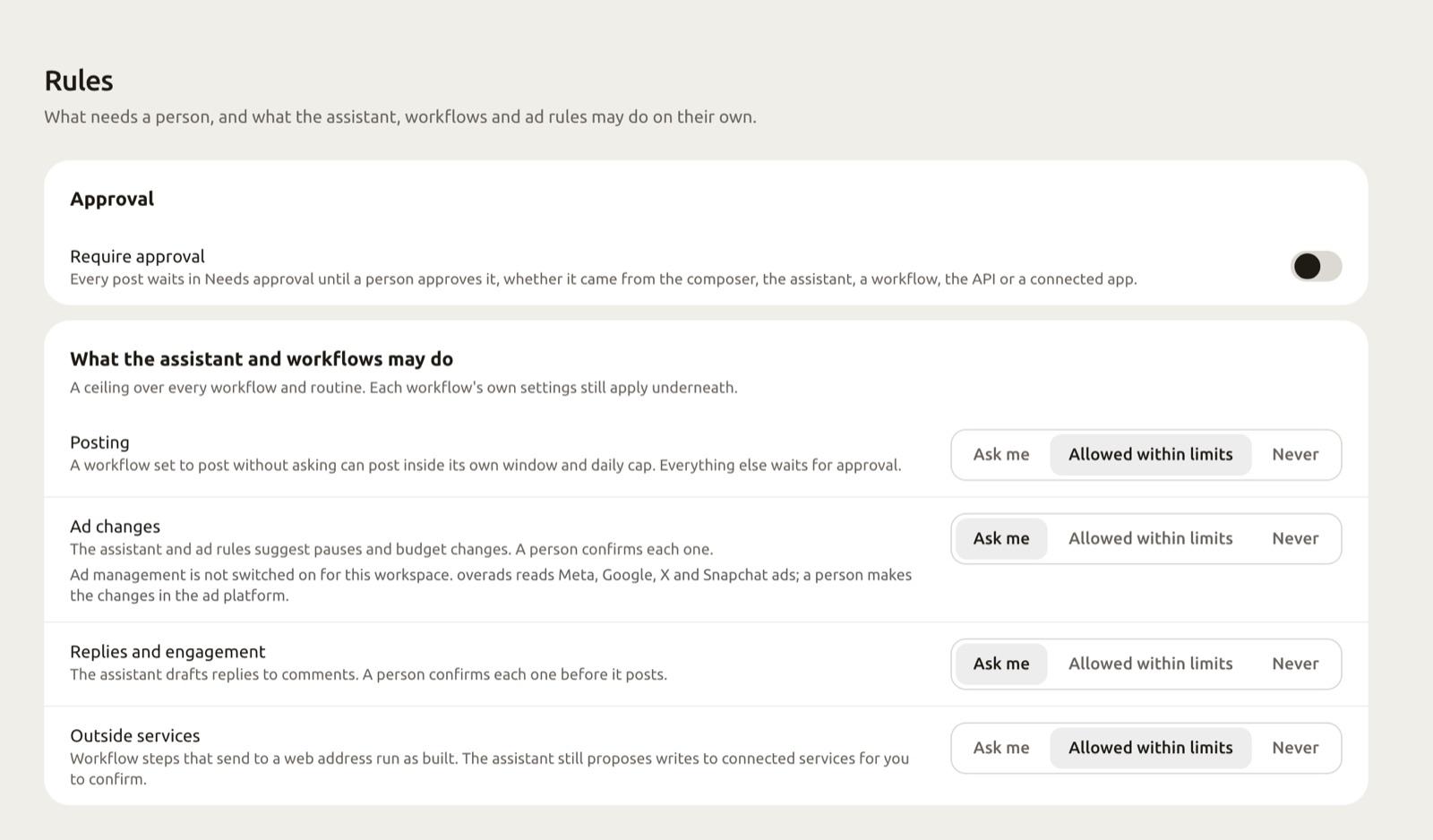
Settings > Rules sets a ceiling over every workflow. Under What the assistant and workflows may do, the Posting row has three choices.
| Posting is set to | What it means |
|---|---|
| Ask me | The assistant and workflows draft posts. A person approves each one before it goes out. |
| Allowed within limits | A workflow set to post without asking can post inside its own daily cap. Everything else waits for approval. |
| Never | The assistant and workflows cannot create or schedule posts. People can still post from the composer. |
Only owners and admins can see and change Rules.
Make every post wait
- Open Settings > Rules.
- Turn on Require approval. The app confirms: Every post now needs approval.
- Leave Posting on Ask me.
With Require approval on, posts from the composer, the assistant, workflows, the API and connected apps all wait in Needs approval, and the composer's own approval switch is locked on.
Ad changes and replies
Meta and Google ad changes run after you approve them; X and Snapchat connect read-only, so overads proposes and a person applies. A reply to a comment is drafted by the assistant and confirmed by a person before it posts.
The other rows in Rules
Posting is one of four rows under What the assistant and workflows may do. The ceiling is described on the page as one over every workflow and routine, with each workflow's own settings still applying underneath.
| Row | On Ask me | On Allowed within limits | On Never |
|---|---|---|---|
| Posting | A person approves each post before it goes out. | A workflow set to post without asking can post inside its own daily cap. Everything else waits. | The assistant and workflows cannot create or schedule posts. |
| Ad changes | The assistant and ad rules suggest pauses and budget changes. A person confirms each one. | Ad rules may apply their own changes once ad management is switched on. The assistant still asks. | The assistant and ad rules cannot suggest or make ad changes. |
| Replies and engagement | The assistant drafts replies to comments. A person confirms each one before it posts. | Each workflow's own settings decide. Today a person still confirms every reply. | The assistant and workflows cannot reply to comments. |
| Outside services | The assistant proposes writes to your connected services for you to confirm. Workflow steps that send to a web address do not run. | Workflow steps that send to a web address run as built. The assistant still proposes writes for you to confirm. | The assistant and workflows cannot send anything to outside services. |
How to check what a workflow is set to
- Open Workflows and open the workflow.
- Find the posting control. It shows only on a workflow that has a post step.
- Read the line under it. Posts from this workflow wait in Approvals for your yes means Ask me first. Posts from this workflow go out on their own means Post without asking, with the cap beside it.
Switching either way shows a confirmation in the app: This workflow now posts without asking, or This workflow asks before it posts.
A worked example: Brew & Bloom
- Brew & Bloom runs two workflows. One drafts a weekly offer post. The other reposts the best post of the week.
- The owner trusts the repost, because the words were already approved once. She opens it, chooses Post without asking, sets the cap to 1 a day, and confirms.
- In Settings > Rules she sets Posting to Allowed within limits, so the workflow's own setting can take effect.
- The repost now goes out by itself, once a day at most. The weekly offer workflow is still on Ask me first, so its posts still wait for her.
- Before a product launch she wants to see everything. She turns on Require approval. From that moment every post waits, the repost included, until she turns it off again.
What still asks, whatever you set
- Posts the assistant drafts in chat. Each shows a card and waits for Yes.
- Replies to comments. A person confirms every reply today.
- Images and videos. A credit is spent only after you approve.
- Ad changes proposed by the assistant.
- A test run. It never publishes or sends, whatever the workflow's posting mode.
Posts from outside the app
A post created over the API or by a connected assistant such as ChatGPT or Claude follows the same Require approval switch. With it on, the post is accepted and lands as pending, with a warning saying it will not publish until a member approves it in the app. Publishing it straight away is refused. There is no API call that approves a post.
If a post went out and you did not expect it
| Check | Where |
|---|---|
| Was it scheduled by a person in the composer? | Publish > Published. A post scheduled by hand goes out at its time unless Needs approval first was on. |
| Is a workflow on Post without asking? | The posting control in that workflow's editor. |
| Is Posting set to Allowed within limits? | Settings > Rules. |
| Is Require approval off? | Settings > Rules > Approval. |
| Who changed a setting? | The audit log records every change to the workspace and keeps it for 90 days. |
Common questions
Can a post skip approval when Require approval is on?
No. With the switch on, every post waits in Needs approval until a person approves it, Publish now included.
How many posts can a workflow publish on its own in a day?
As many as the cap you chose for it: 1, 2, 3, 5 or 10. After that, the workflow's posts wait for approval until the next day.
Does Post without asking let a workflow change my ads?
No. The setting covers posting only. Anything else the workflow does always asks first.
Who can change these settings?
Rules are open to owners and admins only. The posting mode of a workflow is set in that workflow's editor.