

Help Centre / Publishing
What happens when a post fails to publish?
Included in Growth, the one overads plan.
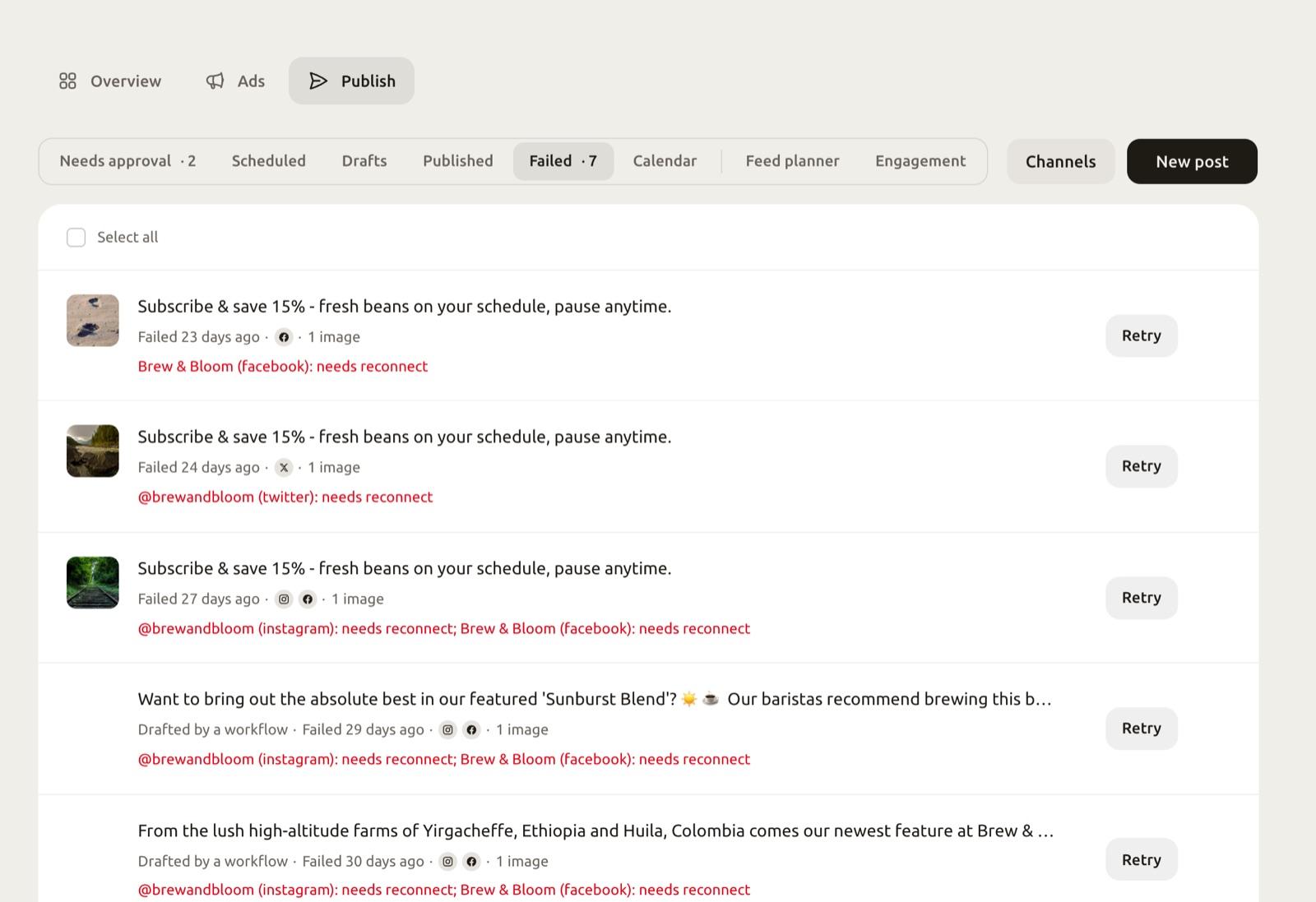
When a post fails, overads moves it to the Failed view in Publish and shows the platform's own error message beside it. The post is kept: fix the cause and press Retry.
Where you see it
- Publish opens on Failed when a post has failed and nothing is waiting for approval.
- The row shows the error exactly as the platform gave it.
- A post that reached some accounts and not others sits in Published, marked Sent to, with how many of its accounts it reached.
What to do
| The row shows | What it means | What to do |
|---|---|---|
| Retry | The platform refused or did not answer. | Read the error, fix the post if the error names something in it, press Retry. |
| Reconnect, with the channel's name | The account's sign-in expired or was withdrawn. | Press it and sign in again. overads then retries the post by itself. |
| Retrying | A retry is being sent. | Wait. The row moves to Published or back to Failed. |
To let a failed post go, open its menu and choose Dismiss. It is marked cancelled and leaves the list. Nothing was published.
Common causes
- The connection expired. A platform sign-in can run out or be withdrawn, and then needs a reconnect.
- The post is over the channel's character limit. The composer stops this before sending, so it mostly happens to posts made over the API.
- The media does not fit the channel: a video on a channel that takes images only, or a file over the channel's size limit.
- A text-only post to a channel that needs a picture or a video, such as Instagram or Pinterest.
The limits for each channel are on posting limits and image and video sizes.
Being told
- Turn on Post failures in Settings > Notifications. Alerts always go to email; Slack, Teams and Discord can be added on the same page.
- On WhatsApp, the Failed runs message tells you when a workflow run failed.
- A workflow can start When something happens, including a post failing, and notify the team.
- On the API, the
post.failedwebhook fires once per account that failed, with the error. See Webhooks.
Posts scheduled while a workspace is paused
A workspace with no plan is paused, and nothing in it runs. Posts that were scheduled for a time that passed while it was paused go back to drafts once a plan is chosen. They do not go out late.
A post that could not be delivered is never counted as published. A count overads could not read is shown as no reading, not as zero.
Every word you may see on a post row
| Word | View | Meaning |
|---|---|---|
| Past due | Needs approval | The scheduled time passed while the post waited for approval. |
| Waiting on client | Needs approval | A client approver has not answered. |
| Due now | Scheduled | The time has come and the post is about to be sent. |
| Publishing | Scheduled | The post is being sent. |
| Not scheduled | Drafts | The post has no time. |
| Rejected, or Changes requested | Drafts | A reviewer or a client sent it back. |
| Sent to, with a count | Published | The post reached some of its accounts. |
| Retrying | Failed | A retry is being sent. |
A worked example: Brew & Bloom
- Brew & Bloom schedules a post to Instagram and LinkedIn for Saturday at 9.
- LinkedIn accepts it. Instagram refuses it, because the Instagram sign-in ran out during the week.
- The post shows it was sent to 1 of 2 accounts. The Instagram row carries Instagram's own error, and its button reads Reconnect Instagram.
- The owner gets an email, because Post failures is on in Settings > Notifications.
- She presses Reconnect Instagram and signs in. The app says: Reconnected. Retrying the post.
- The row reads Retrying, then the post shows as sent to both accounts.
Other menus on a post
| View | Menu choices |
|---|---|
| Scheduled | Publish now, Edit caption, Cancel post. |
| Drafts | Publish now, Resubmit for approval, Discard. |
| Failed | Retry or Reconnect on the row, and Dismiss in the menu. |
Connections that fail before a post does
You do not have to wait for a post to fail. Settings > Channels shows each account as Active, or with the reason it stopped working and a Reconnect button. Settings > Notifications has a Channel connection updates switch for this. On the API, the connection.error webhook fires when a connected account stops working and needs a reconnect.
If a retry fails again
- Read the error again. A platform's message usually names the cause: the text, the media, or the account.
- If it names the media, check image and video sizes.
- If it names the length, check posting limits.
- If it names permissions, reconnect the account and approve everything the platform asks.
- If it makes no sense, write to hello@overads.io with the post and the error text.
What is not a failure
| The post is | Where it sits | Why it has not gone out |
|---|---|---|
| Waiting for approval | Needs approval | Nobody has approved it yet. Approve it, or it stays. |
| Rejected | Drafts | A reviewer sent it back with a note. |
| Cancelled | Out of the lists | Someone chose Cancel post or Dismiss. Nothing was published. |
| Returned to drafts after a pause | Drafts | Its time passed while the workspace had no plan. |
| Held by a disconnected account | Scheduled | Posts for only that account do not go out until it is connected again. |
None of these shows in Failed. Failed holds only posts a platform refused or did not answer.
Common questions
Does overads retry a failed post by itself?
After you reconnect an expired account, yes: overads retries that post. Otherwise press Retry on the row.
My post went to LinkedIn but not Instagram. Is it lost?
No. Each account is tracked separately. The post shows which accounts it reached, and the one that failed carries its own error.
How do I get an alert when a post fails?
Turn on Post failures in Settings > Notifications. The alert goes to email, and to Slack, Teams or Discord if you add one.
Can I remove a failed post from the list?
Yes. Choose Dismiss from its menu. The post is marked cancelled and nothing is published.