

Help Centre / Publishing
How do I connect Instagram to overads?
Included in Growth, the one overads plan.
Open Settings > Channels in overads, press Connect on Instagram and sign in on Instagram. The account must be a Business or Creator account.
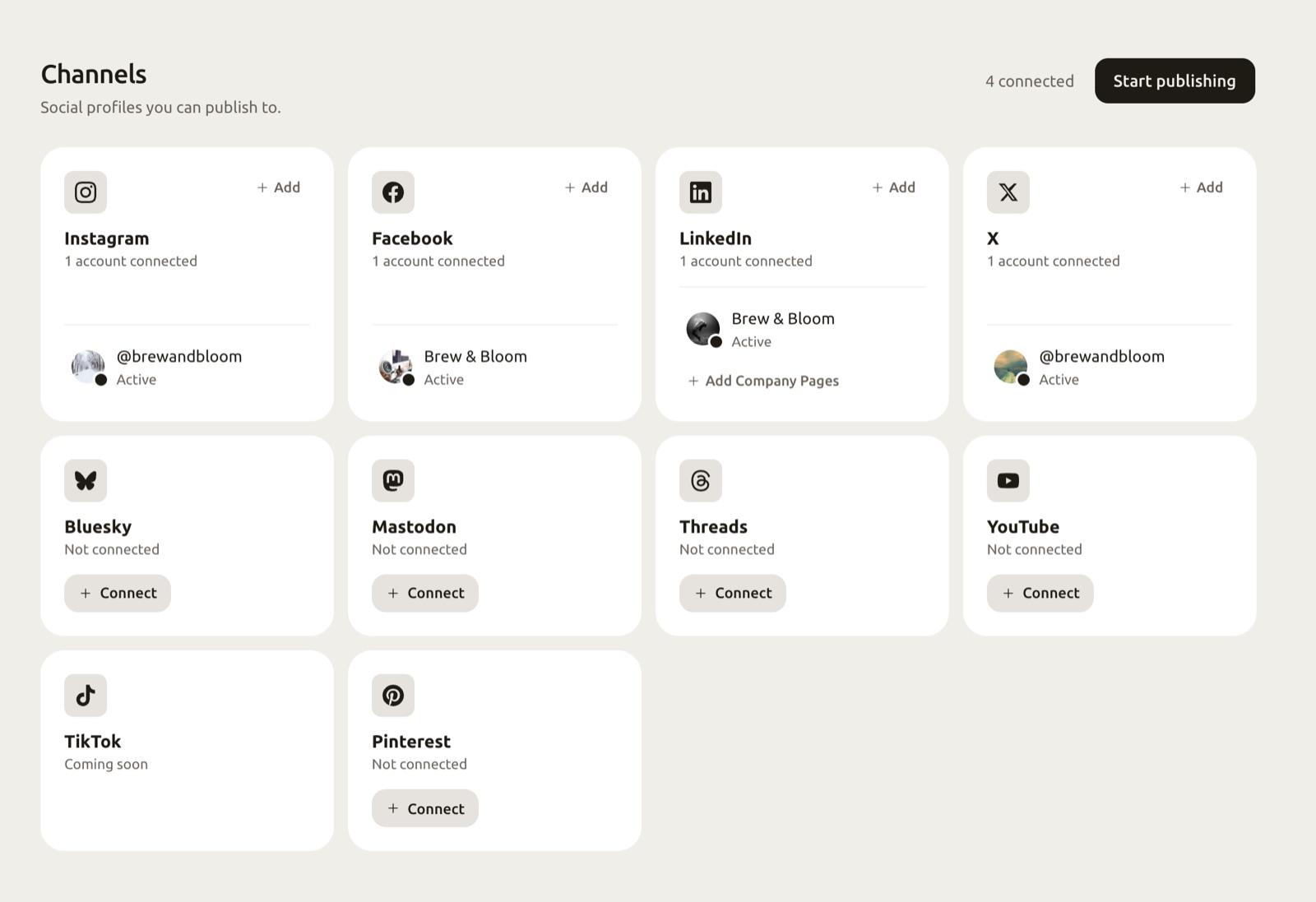
- Open Settings > Channels.
- Press Connect on the Instagram tile.
- Sign in on Instagram and approve what overads asks for.
- Back in overads, the tile shows the account as connected. Press Start publishing to write a post.
Two ways to sign in
| Way in | What it needs | What it reaches |
|---|---|---|
| Sign in on Instagram | A Business or Creator account. No Facebook account or Page. | Instagram publishing only. |
| Connect through Facebook | A Business or Creator account linked to a Facebook Page. | Instagram, plus Pages and ads through the same sign-in. |
The note under the Connect button says which one the button opens. Where it reads Sign in on Instagram, a Connect through Facebook link sits beside it for people who also want Pages and ads. If the tile opens a Facebook login, Instagram connects through the Facebook account that manages it.
If your account is a personal one
Instagram lets only Business and Creator accounts publish through an app. Switch the account type in the Instagram app's settings first, then connect. Through Facebook, the Instagram account also has to be linked to a Page.
What an Instagram post needs
- At least one image or video is required; a text-only post is refused with MEDIA_REQUIRED.
- Up to 10 images, or 1 video up to 300 MB and 15 minutes, which is Meta's cap for Reels. Meta caps Story videos lower, at 100 MB.
- videoType picks Reels or Stories for a video.
A caption takes up to 2,200 characters. In the composer, More options has a First comment field: it is posted under the post, and is a good place for links and extra hashtags. The full limits are on the Instagram platform page.
When the connection stops working
- In Settings > Channels the account shows the reason, or Needs reconnect, with a Reconnect button.
- A post that failed for this reason shows Reconnect Instagram in Publish > Failed. After you reconnect, overads retries the post by itself.
- An account connected before Meta approved publishing on 13 October 2026 may need one reconnect to pick up the publish permission.
overads checks the permission on each connection before it sends. A post is refused before it reaches Instagram when the connection was made without the publish permission.
What you can set on an Instagram post
| Setting | Value | What it does |
|---|---|---|
| videoType | REELS or STORIES | How a video is published |
| shareToFeed | boolean | Also show a Reel in the feed |
| coverUrl | https URL | Cover image for a Reel |
| firstComment | string, up to 2,000 | Posted as the first comment right after the post |
In the composer these appear when an Instagram account is picked. The first comment is under More options. Over the API they are the same settings by the same names.
A worked example: Brew & Bloom
- Brew & Bloom's Instagram is a personal account. The owner switches it to a Business account in the Instagram app.
- In overads she opens Settings > Channels and presses Connect on Instagram. The note under the button reads Sign in on Instagram.
- She signs in on Instagram and approves. The tile reads 1 account connected and the account shows Active.
- She presses Start publishing, picks the account under To, adds a picture and a caption, and puts the menu link in First comment.
- She schedules it. On the day it goes out, the link is posted as the first comment under it.
- Later the brand starts running ads. She presses Connect through Facebook so the same sign-in also reaches the Page and the ad account.
Disconnecting
- Open Settings > Channels and press Disconnect on the account.
- Read the dialog. Scheduled posts for only this account will not go out until it is connected again.
- Leave Keep its posts and history for when you reconnect ticked, unless you want them gone. No password or token is kept either way.
Connecting the same account again puts its posts back on it.
If something goes wrong
| What you see | Why | What to do |
|---|---|---|
| Instagram refuses the sign-in | The account is personal. | Switch to Business or Creator, then connect. |
| The Facebook way finds no Instagram account | The Instagram account is not linked to a Page that login manages. | Link it to the Page in Meta's settings, or use Sign in on Instagram. |
| Needs reconnect on the account | Instagram stopped accepting the sign-in. | Press Reconnect. |
| A post is refused before sending | The connection was made without the publish permission. | Reconnect once, and approve what is asked. |
| A text-only post is refused | Instagram needs an image or a video. | Attach one. |
| A warning that only the first image would go out | Carousels are not switched on for this deployment yet. | Post one image, or wait for the warning to go. |
What overads asks Instagram for
| Way in | Permissions asked for |
|---|---|
| Sign in on Instagram | instagram_business_basic and instagram_business_content_publish. |
| Connect through Facebook | instagram_basic and instagram_content_publish, along with the Page permissions. |
Meta approved both sets at App Review on 13 October 2026. The grant Meta returns is stored on the connection and read each time a post is sent, which is why a connection made without the publish permission is refused before anything reaches Instagram.
Instagram in a workflow
A workflow's Schedule a post step can target the Instagram account like any other connection. If the workflow is saved before Instagram is connected, the draft says it posts to Instagram and offers to connect it, and the workflow will not switch on until it is. Posts it writes wait for approval unless you set that workflow to post without asking.
Common questions
Why can't I connect my Instagram account?
Most often the account is a personal one. Instagram needs a Business or Creator account, and through Facebook it also needs to be linked to a Page.
Do I need a Facebook Page to connect Instagram?
Not when you sign in on Instagram. The Facebook way in needs a Page, and also reaches Pages and ads.
Can overads post a text-only post to Instagram?
No. Instagram needs at least one image or video, so a text-only post is refused.
Can I connect more than one Instagram account?
Yes. Press Add on the Instagram tile and sign in with the next account.