

Help Centre / Workflows and approvals
How do approvals work in overads?
Included in Growth, the one overads plan.
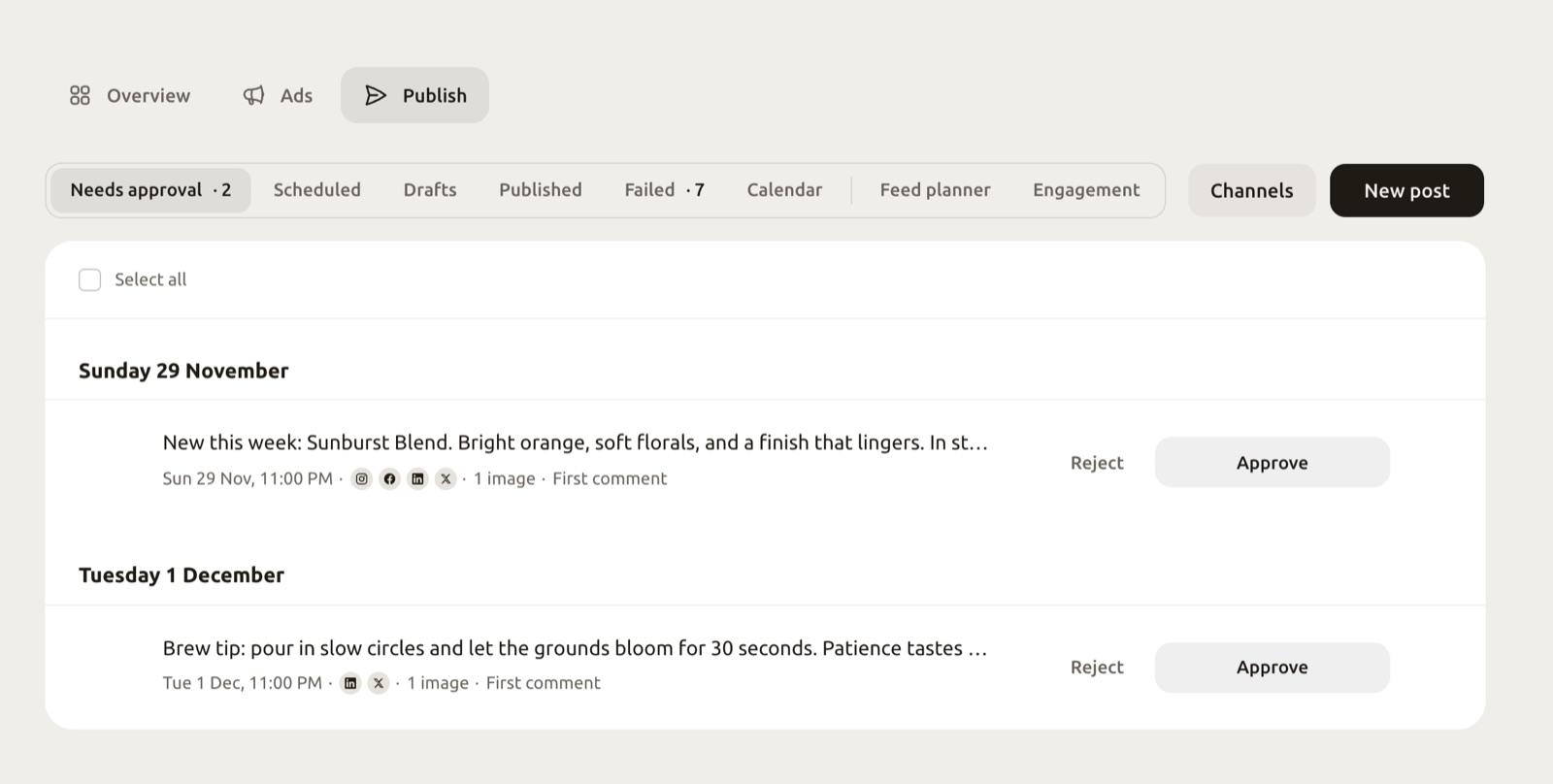
In overads, a post that needs approval waits in the Needs approval view in Publish and goes out only after a person presses Approve. Reject sends the post back to Drafts with your note, and nothing is published.
What sends a post to approval
- A workflow set to Ask me first, which is how every workflow starts. Each post the workflow writes waits for a yes.
- The Needs approval first switch in the composer, under More options. It applies to a scheduled post: pick a time to route the post through review.
- Settings > Rules > Require approval. When it is on, every post waits, whether it came from the composer, the assistant, a workflow, the API or a connected app. The composer then shows its switch on and locked, and Publish now waits as well.
Two places things wait
| Place | What waits there | Buttons |
|---|---|---|
| Publish > Needs approval | Posts | Approve and Reject. A post past its time reads Approve and post now. |
| Approvals | What the assistant prepared: posts, replies, workflows, ad changes and anything else | Confirm and Dismiss, or Confirm all |
Publish opens on Needs approval whenever something is waiting there. The Approvals page shows a count beside its name in the sidebar, says how many items are waiting on you, and groups them under Posts, Replies, Workflows, Ads and Everything else. Nothing on that page has happened yet: the assistant prepares, you decide.
Approve or reject a post
- Open Publish. The Needs approval view lists each waiting post with where it goes and when.
- Press Approve, or press A with the post selected.
- To send it back, press Reject (R). The dialog asks for a note and moves the post to Drafts.
- After Approve, the app confirms when the post goes out. A post whose time has passed goes out within a minute.
- A rejected post shows as Rejected in Drafts. Edit it and choose Resubmit for approval from its menu.
- A post waiting on a client shows Waiting on client with the client's name, and has no Approve button until the client answers.
Other ways to approve
| Way | How |
|---|---|
| Tap Approve or Reject on the message. See approve posts on WhatsApp. | |
| A client, by email | Where client approval is switched on, a client approves their own posts from an email link, with no overads login. See client approval. |
What approval does not cover
Ad changes have their own rule. Meta and Google ad changes run after you approve them; X and Snapchat connect read-only, so overads proposes and a person applies. An ad change the assistant prepares waits on the Approvals page under Ads until someone confirms it.
There is no API call that approves a post. A member approves it in the app. The developer view is in Scheduling and approvals.
The views in Publish
Publish sorts every post into one view. Knowing the views tells you where a post is in its life.
| View | What is in it | Words you may see on a row |
|---|---|---|
| Needs approval | Posts waiting for a yes. | Past due, when the scheduled time has gone by. Waiting on client, with the approver's name. |
| Scheduled | Approved posts waiting for their time, and posts being sent. | Due now. Publishing. |
| Drafts | Posts with no time yet, and posts that were sent back. | Not scheduled. Rejected. Changes requested. |
| Published | Posts that went out, in full or in part. | Sent to, with how many of its accounts the post reached. |
| Failed | Posts a platform refused. | Retrying, while a retry is being sent. |
| Calendar | The same posts by day, in Week or Month. |
Publish opens on Needs approval when anything waits there, on Failed when something failed, and on Scheduled otherwise. An empty Needs approval view reads Nothing is waiting for approval, with a link to the scheduled posts.
What the app says after you answer
| You did | The app says |
|---|---|
| Approved a post with a time ahead | Approved, with the date it goes out. |
| Approved a post past its time | Approved. It goes out within a minute. |
| Approved a post with no time | Approved. It stays in Drafts until you publish it. |
| Rejected a post | Rejected. It is in Drafts. |
| Turned on Require approval | Every post now needs approval. |
The Approvals page in detail
- Each card says what will happen if you confirm: Schedule this post, Post this reply, Save this workflow, switched off, Pause this campaign, Change this budget.
- Confirm runs it. Dismiss drops it, and you can say why: Not relevant, Wrong details, Off brand, Bad timing, Already done or Other.
- Confirm all answers everything in a group at once.
- From the keyboard, J and K move between cards, A confirms and R dismisses.
- After an answer the card shows the outcome: Done, Dismissed, or Could not complete with the reason.
- With nothing waiting, the page reads Nothing waiting on you.
A worked example: Brew & Bloom
- Brew & Bloom has Require approval switched on in Rules, and a weekly workflow on Ask me first.
- On Friday the workflow writes an Instagram post for Saturday at 9. The post appears in Publish > Needs approval.
- A Member opens it and edits the caption. Editing a waiting post is allowed and it stays in the queue.
- The owner presses Approve. The app says the date the post goes out, and the post moves to Scheduled.
- The same day the assistant suggests pausing a campaign. That is not a post, so it waits on the Approvals page under Ads until the owner presses Confirm.
- A second post is off-brand. The owner presses Reject, writes a note, and the post moves to Drafts marked Rejected. The Member rewrites it and chooses Resubmit for approval.
When approving does not work
| What you see | Why | What to do |
|---|---|---|
| No Approve button, and Waiting on client | A client approver has not answered yet. | Wait for the client, or set client approval to Off in Settings > Client approval. |
| Past due | The post's time passed while it waited. | Press Approve and post now, or edit the time first. |
| The composer's approval switch is locked on | Require approval is on in Rules. | Only an owner or an admin can change Rules. |
| A card has no Confirm button | overads cannot make that change, for example in a read-only ad account. | The card gives the reason. Make the change in the platform. |
| The post went to Failed after approval | The platform refused it when it was sent. | See what happens when a post fails. |
Common questions
Why is there no Approve button on a post?
The post is waiting on a client. While a client approver has not answered, the row reads Waiting on client and the team cannot approve past them.
What happens to a post I reject?
The post moves to Drafts with your note and nothing is published. Edit it there, then choose Resubmit for approval.
What if nobody approves a post before its scheduled time?
The post does not go out. It stays in Needs approval marked Past due, and the button reads Approve and post now.
Can the API or an AI assistant approve a post for me?
No. A post created over the API or by a connected assistant waits like any other, and a member approves it in the app.
Who is told when something needs approval?
Approvals reach you in the app and by email, and on WhatsApp once you link your number in Settings > Notifications.