

Help Centre / Workflows and approvals
How do I turn a request into a workflow?
Included in Growth, the one overads plan.
Type the job in plain words on the overads Workflows page and press Build it. overads drafts the workflow and saves it switched off; it runs on its schedule once you review the steps and turn it on.
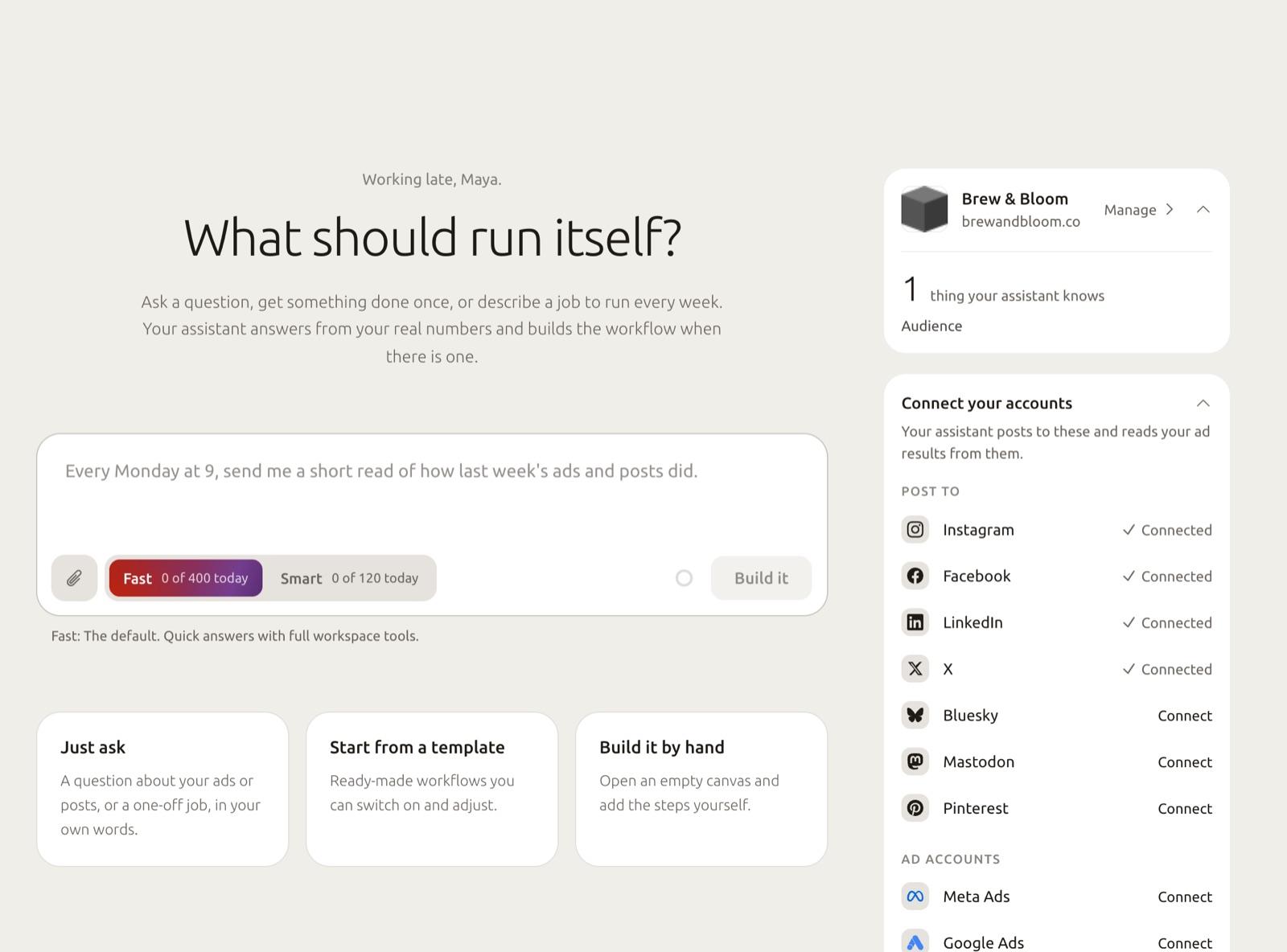
- Open Workflows. The page asks "What should run itself?"
- Describe the job, for example: "Every Monday at 9, send me a short read of how last week's ads and posts did."
- Press Build it. A panel headed Draft, not saved shows the name, a summary and the steps in order.
- Press Save and open, or Start over to describe it again.
- Review every step on the canvas. Press Test run to see what it would do.
- Flip the switch from Paused to On.
Nothing runs until you save the workflow and switch it on. If the workflow posts, each post it writes waits for your approval and goes out when you say yes.
Reading the draft
Each step in the draft carries one of four words: Starts, Reads, Decides or Does. A branch is marked If yes, If no, If it fails or For each item.
- If the workflow posts to a channel that is not connected, the draft says so and offers to connect it. You can save now and connect later.
- If the workflow reads your ads and no ad account is connected, the draft says that too.
- If the assistant knows very little about your brand yet, the draft tells you before you save.
What can start a workflow
| Start | When it runs |
|---|---|
| On a schedule | Every day, every weekday or on the days you pick, at the time and time zone you pick. |
| When an ad number crosses a line | A metric you set is checked every 15 minutes. Needs a connected ad account. |
| When something happens | A post goes out or fails, a new suggestion arrives, or someone comments. |
| When another app calls it | Another tool sends a message to the workflow's private link. |
| When I click Run | Only when you press Run now. |
What the steps can do
| Kind | Examples |
|---|---|
| Read or write something | Read my ad results, Read how my posts are doing, Find my best times to post, Read a Google Sheet, Ask AI to write or decide, Pick a photo or video. |
| Decide which way to go | Check a value, or Ask AI a yes or no question. |
| Do something | Schedule a post, Save a post as a draft, Send me a notification, Draft a reply to a comment, Suggest pausing a campaign, Suggest a budget change. |
A step that suggests an ad change pauses nothing until you say yes. A step that needs an account you have not connected is marked Needs an ad account or Needs a social account.
Test run and Run now
- Test run publishes and sends nothing. Its steps report what they would do, for example Would ask you to approve.
- Run now runs the workflow for real, once, whatever its schedule.
- The Runs tab lists every run with how it began (on schedule, by hand, as a test) and its status: Queued, Running, Completed, Failed or Skipped.
- Open a run to see each step, what went in and what came out. A failed run is shown in red with the error text.
When a workflow will not switch on
A workflow that posts to a channel you have not connected is refused at the switch. The editor names the channel, says the workflow will not run or switch on until it is connected, and shows a Connect button.
Prefer to start from a finished one? The workflow templates list ready-made workflows with their steps. In the app each template is added switched off, so you can change it first.
A worked example: Brew & Bloom
- On Workflows the owner types: When any campaign's cost per result goes over our target, tell me and suggest pausing it. She presses Build it.
- The draft reads: Starts when an ad number crosses a line. Reads my ad results. Decides by checking a value. Does two things, Send me a notification and Suggest pausing a campaign.
- The draft notes that the workflow reads her ads. Her Meta account is already connected, so there is nothing to connect.
- She presses Save and open, sets the line on the start step, and presses Test run. The run shows Would ask you to approve for the pause.
- She flips the switch to On. From then the number is checked every 15 minutes. When it crosses the line she is notified, and the pause waits on the Approvals page for her Confirm.
If something goes wrong
| What you see | Why | What to do |
|---|---|---|
| A channel is not connected, so this workflow cannot post there yet | A post step targets a channel with no connection. | Press the Connect button beside the message. |
| Things to fix before saving, with a count | One or more steps are missing something they need. | Open each marked step and fill it in. |
| The run was not accepted (plan cap or budget) | The workspace has hit a cap for the day. | Check assistant messages and credits in Settings > Billing. |
| A step reads Held by guardrail | Rules, or the workflow's own limits, stopped that step. | Check Settings > Rules and the posting cap. |
| A step says it is not switched on yet and cannot run | That kind of step is not available on this deployment. | Remove the step or replace it. Such steps are not offered under Add a step. |
| A step reads Skipped: the workflow went the other way | A decision step chose the other branch. | Nothing to fix. That is the branch doing its job. |
Common questions
Why will my workflow not switch on?
Most often a channel it posts to is not connected. The editor names it and shows a Connect button; connect it and flip the switch again.
Does a test run post anything?
No. A test run never publishes or sends. Each step reports what it would have done.
Can I build a workflow without describing it?
Yes. Choose Build it by hand for an empty canvas, or Start from a template and adjust it.
Where do I see whether a workflow ran?
Open the workflow and its Runs tab. Each run shows how it started, its status and every step.
Does building workflows by chat have a limit?
Yes. Each message to the assistant counts toward the day's allowance: 400 on Fast and 120 on Smart on Growth. Saved workflows keep running whatever is left of the day's messages.