

Help Centre / Account and data
How do I invite my team to overads?
Included in Growth, the one overads plan. Seats are unlimited and workspaces are unlimited.
In overads, open Settings > Team, press Invite member, enter the email and pick a role. Growth includes unlimited seats and unlimited workspaces.
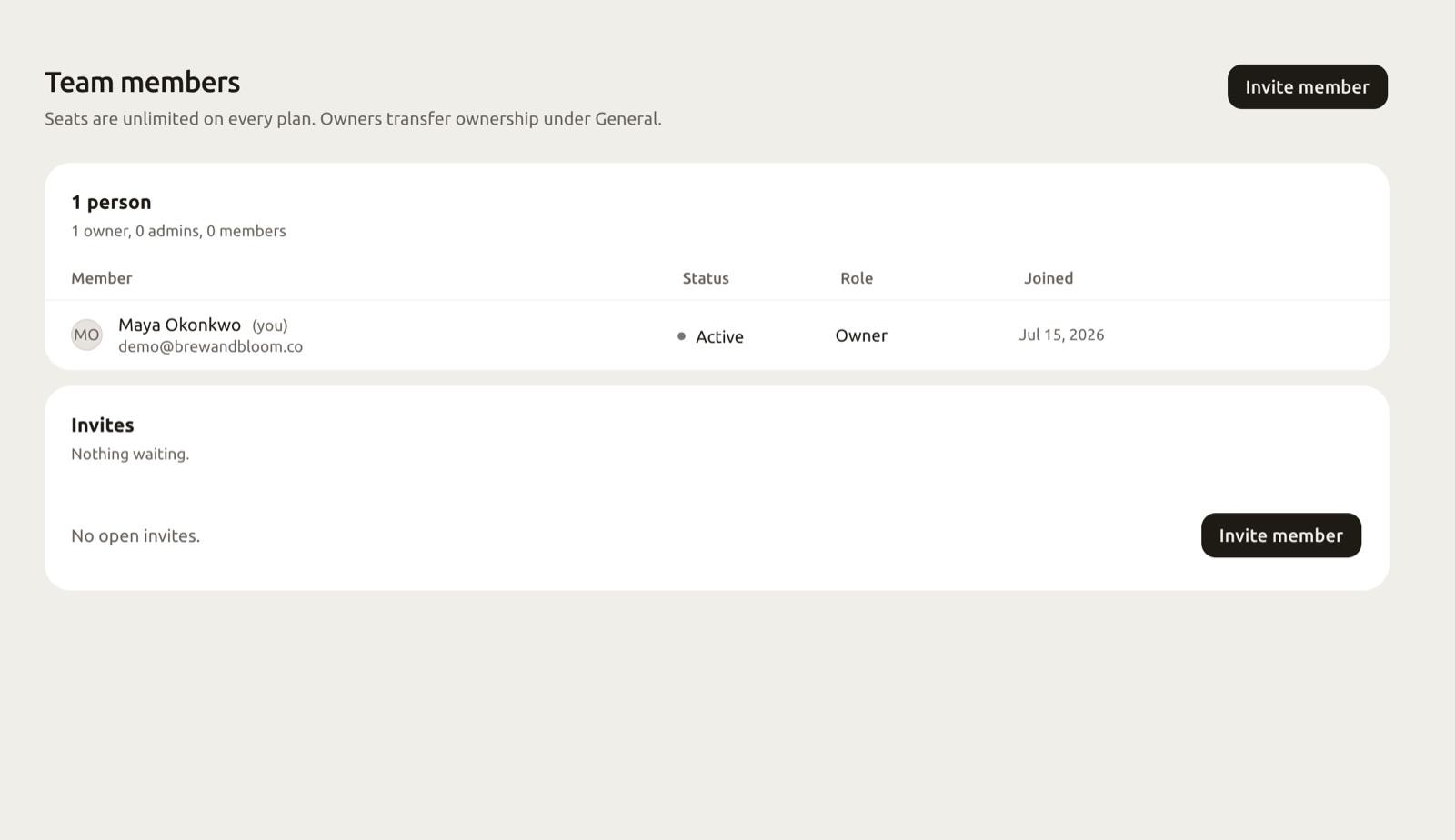
- Open Settings > Team. The page is titled Team members.
- Press Invite member and enter your teammate's email.
- Pick a role: Admin, Member or Viewer. Member is the starting choice.
- Press Generate link. overads emails the invite, and you can copy the link too.
Both the email and the link expire in 7 days. Only owners and admins can create invites.
What your teammate does
- They open the link. If they are not signed in, they are asked to sign in first.
- They sign in with the email the invite was sent to.
- The page reads You're in and takes them to the workspace.
| They see | What it means |
|---|---|
| Wrong account | The invite was issued to another email than the one they are signed in with. Switch account signs them out to try again. |
| Already a member | They are already in the workspace. Nothing to do. |
| Invite expired | The 7 days ran out. Send a fresh invite. |
| Link unavailable | The invite was revoked, or the link is wrong. |
Managing invites and members
- The Invites group lists open invites as Invited or Expired, with when each runs out.
- Copy link copies a pending invite again. Revoke stops the link working immediately.
- To change someone's role, pick a new one in the Role column.
- Remove takes a member out. They lose access to the workspace straight away.
- Nobody can remove the owner, or themselves.
Roles
| Role | What it can do |
|---|---|
| Owner | Full control. Manages billing, can transfer ownership or delete the workspace. One owner per workspace. |
| Admin | Invites and manages people, edits brand settings and channels. Cannot delete the workspace. |
| Member | Works in the workspace: campaigns, content and publishing. No people or billing management. |
| Viewer | Read-only. Sees dashboards and reports. Good for clients and stakeholders. |
The full table is on what each role can do.
Workspaces
A workspace is one brand with its own ad accounts, channels, team and settings. Press New workspace, give it a name and, if you like, its website, then press Create workspace. One subscription covers every workspace its owner has, client workspaces included, so an agency adds a workspace per client without a second plan.
A client who only needs to approve posts does not need a seat where client approval is switched on. See client approval.
What the Team page shows
| Part | What is in it |
|---|---|
| The people count | How many people are in the workspace, summed as owners, admins and members. |
| The members table | Member, Status, Role and Joined. A member's status reads Active. |
| The Invites group | Invitee, Status, Role and Expires. An invite reads Invited or Expired. With none open it reads Nothing waiting. |
| The page note | Seats are unlimited on every plan. Owners transfer ownership under General. |
Accepted invites leave the Invites group and appear as members. Pending and expired ones stay listed until you revoke them.
A second way to invite: the link on General
Settings > General has an Invite link block with a Create link button. It makes the same kind of link, emails it too, and the link expires in 7 days. Only admins and owners can create invites there as well.
A worked example: Brew & Bloom
- The owner of Brew & Bloom opens Settings > Team and presses Invite member.
- She enters her marketing lead's work email, leaves the role on Member, and presses Generate link. The app says: Invite sent. We emailed them the link too.
- She copies the link as well and sends it in the team chat. Both expire in 7 days.
- The marketing lead opens the link signed in with a personal email. The page reads Wrong account and names both addresses. She presses Switch account and signs in with her work email.
- The page reads You're in, and she lands in the workspace.
- The owner invites the accountant as a Viewer, who can read dashboards and reports and change nothing.
- A freelancer's invite sits unopened for two weeks and reads Expired. The owner presses Revoke and sends a fresh one.
- When the freelancer's contract ends, the owner presses Remove on the row and confirms with Remove member. Access ends straight away.
If inviting does not work
| What you see | Why | What to do |
|---|---|---|
| Enter a valid email | The address is not well formed. | Correct it. |
| No Invite member button | You are a Member or a Viewer. | Ask an owner or an admin. |
| Wrong account | The teammate is signed in with another email. | They press Switch account and sign in with the invited email. |
| Invite expired | Seven days passed. | Revoke it and create a new one. |
| Link unavailable | The invite was revoked or the link is incorrect. | Create a new one and send the whole link. |
| Couldn't accept invite | Something else went wrong. | They press Sign in to try again. |
Agencies: one workspace per client
A team is per workspace. Create a workspace for each client, invite your own team to each with the roles they need, and invite the client as a Viewer if they should read the reports. One subscription covers all of those workspaces. Developers can create client workspaces over the API too.
Handing a workspace over
- The owner opens Settings > General and finds the Ownership group.
- Under Transfer ownership, they choose a member and press Transfer.
- They confirm in the dialog titled Transfer ownership?
The chosen member becomes the owner and the previous owner becomes an admin. A workspace that pays for your plan cannot be transferred while the plan runs: cancel it first, or ask us to move it.
Common questions
How many people can I invite?
Seats are unlimited on Growth. Adding a teammate does not change what you pay.
How long does an invite last?
Seven days. After that the teammate sees Invite expired, and you send a fresh one.
My teammate sees Wrong account. What now?
They are signed in with a different email than the invite was sent to. They press Switch account and sign in with the invited email.
Can I resend an invite?
Copy the pending invite's link again with Copy link, or revoke it and create a new one.
How do I make someone else the owner?
The owner opens Settings > General and uses Transfer ownership. The chosen member becomes the owner and the previous owner becomes an admin.