

Social media automation for small business: what a small team can hand to AI, and what stays human
A small team cannot staff every channel. AI can now draft, schedule and report on a timetable, while a person keeps the final say. What to hand over, what X, LinkedIn, Instagram and the FTC keep human, and a weekly routine.
TL;DR
- A small team automates recurring marketing work by describing each job once, letting an AI agent draft and schedule it on a timetable, and keeping one rule: nothing publishes until a person approves it. AI drafts, schedules and reports; people keep approval, voice and replies.
- Software that runs without a full-time marketer needs three parts: a schedule or trigger that starts the work, an approval step that waits for a person, and a record of what ran. Schedulers, automation tools and AI agents each cover a different share of that.
- The platforms draw part of the human line for you: X bans unsolicited automated replies and needs written approval for AI reply bots (rules updated April 2026), and the FTC's 2024 rule bans AI-generated fake reviews.
- Most US firms are small: 36.2 million small businesses make up 99.9% of firms (SBA, February 2026), and under 20% of firms with 1 to 4 employees used AI in spring 2026 (Census, May 2026).
How can a small team use an AI agent to automate recurring marketing work?
A small team uses an AI agent for recurring marketing work by turning each repeating job into a written instruction, letting the agent draft and schedule that job on a timetable, and routing every draft to one named person who approves it before it publishes. The team stops typing the same post every week; it does not stop deciding what goes out.
Recurring is the key word. A weekly offer post, a Monday read of last week's results and a monthly roundup each have the same shape every time, so an instruction written once can produce them again and again. One-off work, such as a launch or a reply to a complaint, still starts with a person.
The setup above works in most tools that can run on a schedule. The parts that matter are the test run, which shows what would have been posted without posting it, and the named approver. An approval step with no owner turns into a queue nobody reads. Teams that already plan in a calendar can feed the instruction from it; the guide to building a social media content calendar covers the fields worth keeping.
Why small teams automate social media now
Small teams automate social media because there are more channels than people. The US Small Business Administration's 2026 small business FAQ counts 36,207,130 small businesses, 99.9% of all US firms. A firm that size rarely has a full-time marketer for Instagram, LinkedIn and X at once.
AI use is still thin at the small end. The US Census Bureau's May 2026 report on business AI use put the national rate at 19.8% of firms on May 3, 2026, with 37% of firms of 250 or more employees using AI and under 20% of firms with 1 to 4 employees. The same survey counts marketing among the 15 business functions it asks about.
What a small team can hand to AI, and what should stay human
A small team can hand AI the work that repeats and can be checked before it ships: first drafts, scheduling, results summaries and reply drafts. A person should keep the work that carries the brand's judgement or speaks to one customer: the approval itself, the voice rules, sent replies and messages, and anything about news.
| Job | Hand to AI? | Why |
|---|---|---|
| Drafting posts | Yes, as drafts | A draft is cheap to fix before it ships. |
| Scheduling | Yes | Timing is a rule, not a judgement. |
| Weekly results summary | Yes | It reads numbers the accounts already hold. |
| Approving what publishes | No | Someone has to answer for what the brand said. |
| Brand voice rules | No, a person writes them | The AI follows the rules; it should not set them. |
| Replies and direct messages | Drafts only | Platform rules restrict automated replies; see the next table. |
| Posts about news or a crisis | No | Context changes faster than a schedule. |
| Reviews and testimonials | Never | The FTC bans AI-generated fake reviews. |
Voice is the part teams most often skip. Writing down how the brand sounds, and what it never says, is what keeps AI drafts usable; the guide to brand voice guidelines for AI sets out what to include.
What the platforms' own rules say you may automate
X, LinkedIn, Instagram and the US Federal Trade Commission each publish rules that decide part of the hand-off for you. Automated posting is allowed within limits; automated conversation with people who did not ask for it mostly is not. The table records what each page said when read on November 29, 2026.
| Source | Automated posting | Automated replies and engagement | What stays human |
|---|---|---|---|
| X automation rules (updated April 2026) | Allowed for informational, entertainment or novelty posts; no duplicative posts across accounts; no automated posts about trending topics | Unsolicited automated replies and mentions are not permitted; AI reply bots need X's prior written approval | Replying to people who did not opt in |
| LinkedIn prohibited software page | The page does not name scheduling tools | Bans bots and software that automate activity or manipulate LinkedIn's algorithms | Engagement: likes, comments, connection requests |
| Instagram content publishing docs | Supported through the API, up to 100 API-published posts per account in a 24-hour moving period | Not covered by this page | Not stated |
| FTC final rule on fake reviews (August 14, 2024) | Not covered | Bans AI-generated fake reviews and testimonials that misrepresent who wrote them | Reviews must come from real customers |
X's automation rules are the most specific. They allow automated posts, but say sending automated replies to posts found by keyword search alone is not permitted, and that a user following an account is not on its own an opt-in. They also say any AI reply bot needs prior written and explicit approval from X. LinkedIn's prohibited software page bans bots and browser extensions that automate activity on the site, and warns that accounts using them may be restricted. Meta's Instagram content publishing guide documents API posting with a limit of 100 API-published posts in a 24-hour moving period, far above what a small team posts. The FTC's final rule, announced August 14, 2024, names AI-generated fake reviews among the testimonials businesses may not create, buy or spread.
The practical reading for a small team: schedule posts through a tool that uses each platform's official API, never a browser extension, and keep a person on anything addressed to another person.
A weekly social media routine for a team of one to five
A weekly social media routine for a small team gives the AI the drafting and the clock, and gives a person three short checkpoints: approve on the day drafts arrive, answer people every day, and read the results on Monday. The routine below assumes three posts a week on two or three channels.
| When | The AI does | A person does |
|---|---|---|
| Monday | Sends a short read of last week's posts and results | Reads it and picks one thing to change this week |
| Tuesday | Drafts the week's posts from the standing instructions | Approves, edits or rejects each draft |
| Wednesday to Friday | Publishes approved posts at their times | Answers comments and messages; sends reply drafts worth sending |
| Friday | Drafts next week's recurring post | Approves it, or holds it if news makes it wrong |
| Monthly | Drafts a roundup of the month's best post | Decides whether the instructions need rewriting |
The person's column is short on purpose. If approving takes longer than writing would have, the instructions are too vague; rewrite them rather than editing every draft by hand.
Which marketing automation software can run continuously without requiring a full-time marketer?
Marketing automation software runs continuously without a full-time marketer when it combines a schedule or trigger, an approval step that waits for a person, and a log of what ran. Social schedulers with AI writing, general automation tools with an approval step, and AI marketing agents each provide some of those parts.
| Kind | Example | What runs on its own | Where a person comes in |
|---|---|---|---|
| Social scheduler with AI writing | Buffer | Posts go out at their scheduled times | A person writes or prompts each post; Buffer says its scheduling is not AI-powered |
| General automation tool | Zapier | Multi-step workflows on triggers | Its Human in the Loop step pauses a run for approval, on Professional, Team and Enterprise plans |
| AI marketing agent | overads | Recurring jobs drafted and scheduled from a sentence | Each post waits for a yes unless a workflow is switched to post on its own |
Buffer's AI Assistant page says the assistant drafts platform-specific posts and repurposes one post into several, and that core features such as scheduling are not AI-powered. Zapier's Human in the Loop help article describes a Request Approval step that pauses a Zap until a person approves, declines or edits, with a timeout that either skips and continues or ends the run. That timeout choice matters: skip and continue means an unanswered post can still ship.
For a fuller list of agents, the comparison of the best AI marketing agents sets them side by side, and the n8n, Zapier and Make cost breakdown counts what one post costs in each automation tool. To compare the tools that build a workflow from a single sentence, see AI marketing workflow builders compared.
Where small teams go wrong with social media automation
Small teams go wrong with social media automation when the approval step has no owner, when one post is copied unchanged to every account, and when replies are automated. Each of these has a simple fix.
- Nobody owns the queue. Name one approver and one backup, and pick a tool where an unanswered post waits rather than ships.
- Identical posts everywhere. X's rules forbid duplicative or substantially similar posts across accounts you run, and each network reads differently; draft one version per channel.
- Automated replies. Keep replies as drafts a person sends, for the reasons in X's rules above.
- Reports nobody reads. A Monday summary is only useful if someone changes one thing because of it.
- Instructions that never change. Rewrite the standing instructions when the same edit shows up on three drafts in a row.
Where overads fits
overads runs recurring social media jobs for small teams from a sentence and holds each post for a person's approval. On the overads Workflows page a team describes a job, such as a weekly post or a Monday results read, and overads drafts the workflow saved switched off; a test run publishes nothing, and the workflow runs only once someone switches it on, per the help article on turning a request into a workflow. overads publishes to Instagram, Facebook, LinkedIn, X, Bluesky, Mastodon and Pinterest.
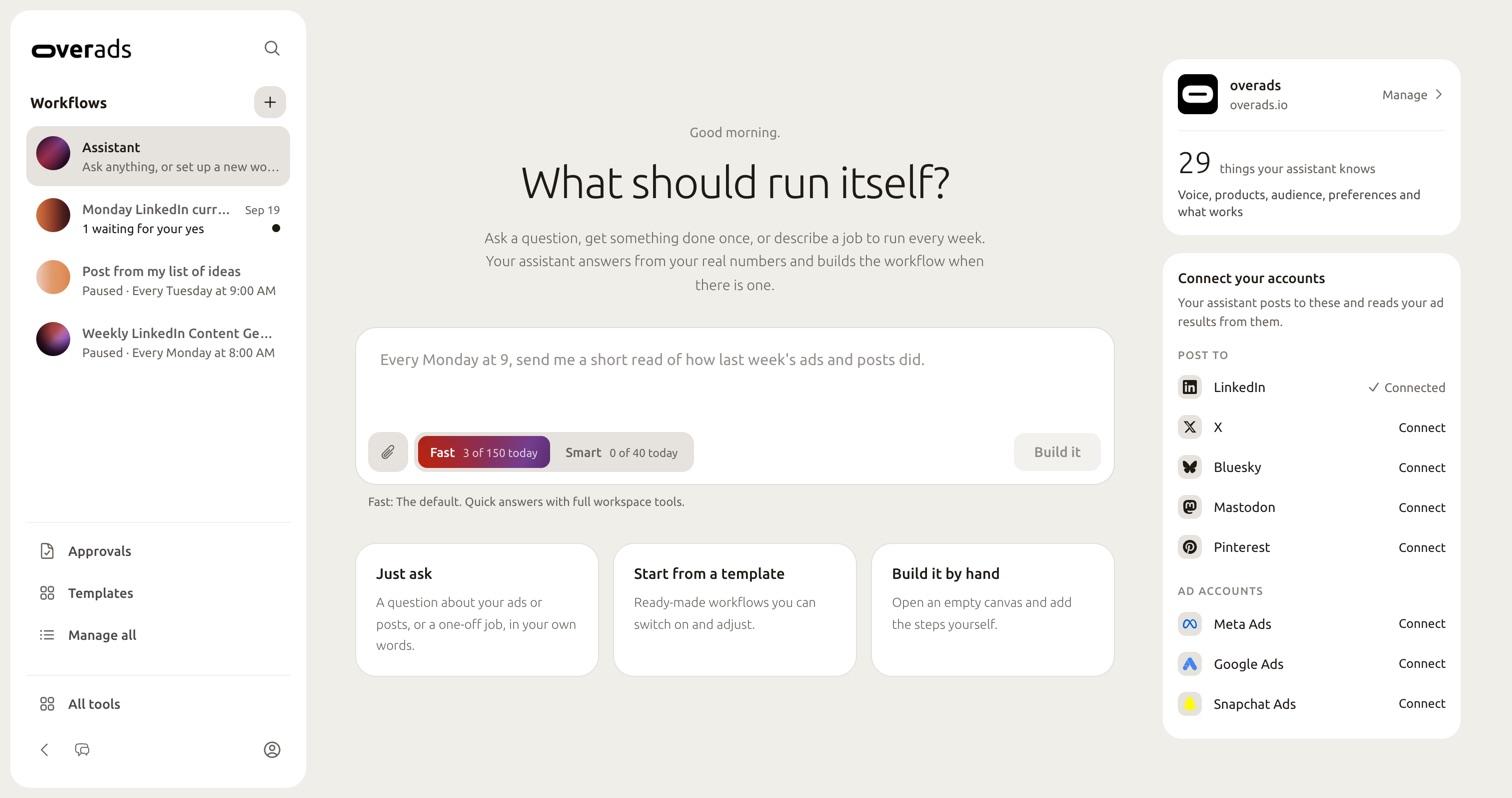
Every overads workflow starts on Ask me first, so each post it writes waits for approval in the app, on WhatsApp once a member links a number, or in the Slack channel a team picks for approvals. A workflow can be switched to post without asking, inside a daily cap of 1 to 10 posts, and owners and admins can turn on Require approval in Settings > Rules to make every post wait, as the article on whether overads can post without approval explains. A post nobody approves does not go out.
What overads does not do, and when another tool fits better:
- overads does not post to Threads, YouTube and TikTok yet. A team whose audience is mainly there needs another scheduler for now.
- overads does not send replies on its own. The assistant drafts a reply to a comment and a person confirms every one.
- overads only knows marketing work. A chain that touches a help desk, a database or an internal tool belongs in Zapier, Make or n8n.
- overads does not replace a person who knows the customers. It removes the drafting and the timetable; the judgement stays with the team.
- Meta and Google ad changes run after you approve them; X and Snapchat connect read-only, so overads proposes and a person applies.
Approving on the move is covered in how to approve posts on WhatsApp.
Frequently asked questions
Should an AI agent reply to comments on its own?
Not for a brand account. X bans automated replies to people who have not opted in and asks for written approval before any AI reply bot runs, so the safe pattern is an AI draft that a person sends.
Do I still need a social media manager if I automate?
Someone still has to own the account: approve drafts, answer people and decide what the brand says about news. Automation removes the typing and the timetable, not that judgement.
What happens if nobody approves a post in time?
It depends on the tool. In overads the post does not go out and waits marked Past due; Zapier's approval step lets you choose to skip and continue, or end the run, when its timeout passes.
Sources
- Automation rules. X Help Center. Accessed Nov 29, 2026.
- Prohibited software and extensions. LinkedIn Help. Accessed Nov 29, 2026.
- Content publishing. Meta for Developers (Instagram Platform). Accessed Nov 29, 2026.
- Federal Trade Commission Announces Final Rule Banning Fake Reviews and Testimonials. US Federal Trade Commission, Aug 14, 2024. Accessed Nov 29, 2026.
- Large Firms With at Least 20 Employees Biggest AI Users. US Census Bureau, May 26, 2026. Accessed Nov 29, 2026.
- Frequently Asked Questions About Small Business 2026. US Small Business Administration, Office of Advocacy, Feb 3, 2026. Accessed Nov 29, 2026.
- Social Media AI Tools for Content Creation. Buffer. Accessed Nov 29, 2026.
- Request approval to keep your workflow running with Human in the Loop. Zapier Help Center, Oct 26, 2026. Accessed Nov 29, 2026.
- How do I turn a request into a workflow?. overads Help. Accessed Nov 29, 2026.
- Can overads post without my approval?. overads Help. Accessed Nov 29, 2026.
- How do I approve posts on WhatsApp?. overads Help. Accessed Nov 29, 2026.
Drafted with AI assistance, then checked against primary sources and the product itself by the overads team.
Keep reading
Workflows · 15 min read
Human in the loop AI for marketing: let the agent draft, keep a person on send
Human in the loop AI drafts and proposes; a person approves before anything goes out. Which marketing tasks are safe to automate, the guardrails that stop a workflow running away, and how Zapier, n8n and overads compare.
Social publishing · 8 min read
How to build a social media content calendar people keep using
A content calendar works when it shows status, not just dates. The fields to keep, each network's own scheduling window from its help pages, a weekly routine, and room for approvals.
Workflows · 9 min read
n8n vs Zapier vs Make for social media automation: what one post costs in each
n8n bills a workflow run, Zapier an action step and Make every module, triggers included, so the same post to four networks costs 1, 4 or 5 units. A dated price count, native posting by network, and where approvals sit.
Your marketing runs itself. You just approve.
Describe a recurring job once. overads drafts it, holds it for a person's yes in the app, on WhatsApp or in Slack, and publishes to Instagram, Facebook, LinkedIn, X, Bluesky, Mastodon and Pinterest.
Get started